emuLearning
Daily learning for Canadian families.
Frontend Engineering & Product Design
2026
Team details
Collaborative product team
 Open full size
Impact
Overview
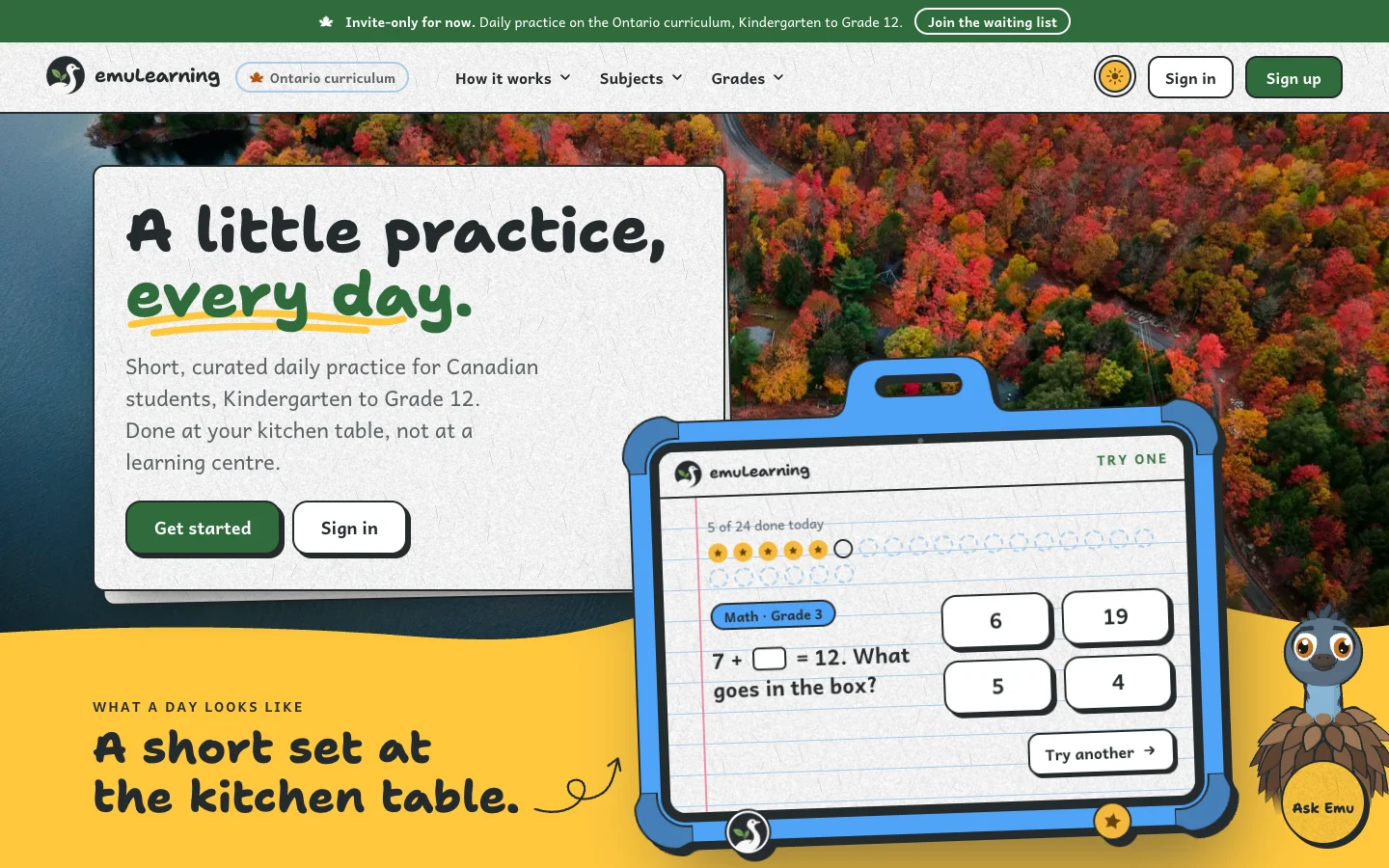
emuLearning is a team-built daily-practice platform based on the Ontario curriculum, designed for Canadian students and their families.
Read the full overview
The product targets Kindergarten to Grade 12; the current question bank covers K–9 with human-authored, template-expanded content. I contributed frontend engineering and product design across interactive learning previews, custom authentication, learner management, and responsive interfaces. The public site offers a waiting list; the parent dashboard and weekly reports remain in development.
emuLearning is a team-built daily-practice platform based on the Ontario curriculum, designed for Canadian students and their families. The product targets Kindergarten to Grade 12; the current question bank covers K–9 with human-authored, template-expanded content. I contributed frontend engineering and product design across interactive learning previews, custom authentication, learner management, and responsive interfaces. The public site offers a waiting list; the parent dashboard and weekly reports remain in development.
Who it serves
Students
Short daily practice and a clear, one-question-at-a-time experience. Interactive previews let children try a question before signing in.
Parents & caregivers
A shared family account with learner selection, settings, and learner removal and recovery interfaces. Clear sign-in and account-recovery flows support families using shared devices.
Inside the build
Contributions / 04
- Built a working sample-question tablet and question carousel, with answer feedback and seasonal visuals.
- Implemented custom Clerk-based authentication forms for passwords, Google sign-in, verification codes, password recovery, and invitations.
2 more contributions
- Built parent-facing settings, learner removal and recovery interfaces, account navigation, and loading and error states alongside the backend team.
- Added accessible feedback, field-error associations, focus handling, French language annotations, and regression tests; adjusted the mobile helper so it does not cover important controls.
Tech Stack
Challenges
- 1Explaining a learning product to families through usable previews instead of promises.
- 2Keeping sign-in, learner selection, and account settings visually consistent without adding distractions to a child’s practice.
- 3Making interactive previews and authentication forms usable on small screens and with assistive technology.
Solutions
- ✓Built a working sample-question tablet and question carousel, with answer feedback and seasonal visuals.
- ✓Implemented custom Clerk-based authentication forms for passwords, Google sign-in, verification codes, password recovery, and invitations.
- ✓Built parent-facing settings, learner removal and recovery interfaces, account navigation, and loading and error states alongside the backend team.
- ✓Added accessible feedback, field-error associations, focus handling, French language annotations, and regression tests; adjusted the mobile helper so it does not cover important controls.
Key Learnings
Designing distinct experiences for children and the adults managing their accounts.
Showing real product behavior while distinguishing implemented features from planned work.
Combining expressive visual design with keyboard access, mobile usability, and testable interactions.